
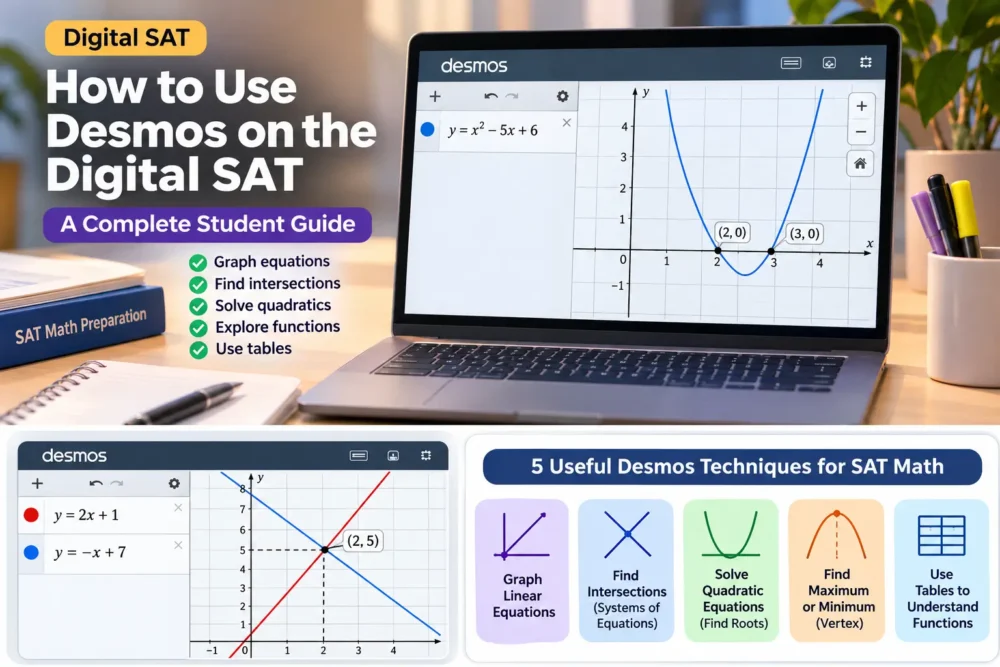
Preparing for the Digital SAT Math section? Learning how to use the Desmos graphing calculator can help you solve selected math questions more efficiently and understand mathematical concepts visually.
The Digital SAT provides an integrated Desmos calculator through the Bluebook testing application. Students can access both graphing and scientific calculator options during the Math section.
From graphing equations and finding intersections to identifying quadratic roots, Desmos can become a valuable tool in your SAT preparation.
In this guide, you will learn how to use Desmos on the Digital SAT, explore practical examples and discover strategies to improve your SAT Math problem-solving skills.
What Is Desmos on the Digital SAT?
Desmos is an online graphing calculator that allows students to enter mathematical expressions, plot graphs, evaluate functions and explore mathematical relationships.
On the Digital SAT, Desmos is integrated into College Board’s Bluebook testing application.
Students can access both:
- Graphing Calculator: For plotting equations, exploring functions and identifying intersections.
- Scientific Calculator: For performing standard mathematical calculations.
Students can switch between these calculator options during the SAT Math section.
What Can You Do With Desmos on the SAT?
Desmos can help you:
- Graph linear and quadratic equations.
- Find intersections between two graphs.
- Identify the roots of quadratic equations.
- Explore functions visually.
- Evaluate mathematical expressions.
- Create tables of input and output values.
- Check answers using graphical methods.
Quick answer: Desmos is useful on the Digital SAT because it allows students to visualise equations and explore mathematical relationships. However, it should support your mathematical understanding, not replace it.
How to Access Desmos During the Digital SAT
The Digital SAT is administered through the Bluebook application.
Follow these steps to access the calculator:
- Download and open the official Bluebook application.
- Complete a Bluebook test preview or official practice test.
- Navigate to the Math section.
- Select the calculator tool.
- Choose the graphing or scientific calculator option.
- Enter your mathematical expressions and explore the available functions.
Important: The calculator is available throughout the Math section. You do not need to wait for a separate calculator-only module.
Before your actual examination, practise using the integrated calculator inside Bluebook so you are comfortable with the testing environment.
5 Useful Desmos Techniques for SAT Math
Let’s explore five practical techniques that can help you approach different SAT Math questions.
1. Graphing Linear Equations
Linear equations are an important part of SAT Math.
Consider this equation:
y = 2x + 3
To graph this equation:
- Open the Desmos graphing calculator.
- Enter y = 2x + 3 into the expression field.
- Observe the straight line displayed on the graph.
- Change the slope or y-intercept to understand how the graph changes.
How does this help?
You can quickly understand the relationship between variables and visualise the equation instead of relying only on algebraic calculations.
2. Finding the Intersection of Two Equations
Finding the intersection of two lines is useful when solving systems of equations.
Consider:
- y = 2x + 1
- y = -x + 7
Enter both equations into Desmos.
The graphs intersect at:
x = 2 and y = 5
Therefore, the solution is (2, 5).
Desmos can highlight the intersection point when you select the graph.
Why is this useful?
Instead of solving both equations manually, you can use their intersection to identify the common solution.
Remember to check that the coordinates satisfy both original equations.
3. Solving Quadratic Equations
Quadratic equations are another important topic in SAT Math.
Consider:
x² – 5x + 6 = 0
Enter the following into Desmos:
y = x^2 – 5x + 6
The graph crosses the x-axis at two points:
- x = 2
- x = 3
These are the roots of the quadratic equation.
Student tip: The x-intercepts of a graph represent the solutions when the expression is equal to zero.
This technique is particularly helpful when a question asks you to identify the roots of a quadratic function.
4. Finding the Maximum or Minimum of a Function
Desmos can help you understand the highest or lowest point of a quadratic graph.
Consider:
y = -(x – 3)² + 9
Enter this equation into Desmos.
You will see a downward-opening parabola.
Its maximum value is 9, which occurs when x = 3.
The vertex is:
(3, 9)
When is this useful?
This approach can help you understand questions involving:
- Maximum values.
- Minimum values.
- Quadratic functions.
- Turning points and vertices.
5. Using Tables to Understand Functions
Desmos also allows you to create tables to explore relationships between input and output values.
For example:
f(x) = 2x + 4
Enter the function and create a table to explore different x-values and their corresponding f(x)-values.
This can help you understand:
- Function rules.
- Input and output relationships.
- Numerical patterns.
- Linear and nonlinear functions.
Tables are particularly useful when a question provides numerical information instead of a graph.
Common Mistakes Students Should Avoid When Using Desmos
Having access to a graphing calculator does not automatically improve your SAT Math performance.
Here are five common mistakes to avoid.
1. Using Desmos for Every Question
Some questions are quicker to solve mentally or through basic algebra. Avoid wasting time entering simple calculations.
2. Entering Equations Incorrectly
A missing bracket, incorrect sign or misplaced exponent can change the entire graph.
Always double-check what you enter.
3. Ignoring the Question’s Requirements
If a question asks for the value of x, do not accidentally select the y-coordinate of an intersection.
Read the question carefully before choosing your answer.
4. Depending Completely on Graph Interpretation
Graphs can sometimes make approximate values difficult to identify. Use exact algebraic methods when precision is important.
5. Practising Only With the Calculator
Desmos is a supporting tool, not a replacement for understanding mathematical concepts.
You still need to develop your algebra, functions, geometry and problem-solving skills.
How to Practise Desmos for the Digital SAT
The best way to become comfortable with Desmos is to include it in your regular SAT preparation.
Try following this five-step practice routine.
Step 1: Understand the Basics
Learn how to enter equations, use graphing features and interpret graphs.
Step 2: Practise Equation Solving
Work with linear equations, quadratic equations and systems of equations.
Step 3: Solve Timed Questions
Practise SAT-style questions while keeping track of your time.
Step 4: Compare Different Methods
Solve a question manually first, then try using Desmos. Identify which method is more efficient.
Step 5: Review Your Mistakes
Understand whether an incorrect answer came from a mathematical concept, calculator entry or interpretation error.
Is Desmos Enough to Score Well in SAT Math?
No. Desmos is a useful tool, but it cannot replace a strong understanding of mathematics.
A successful SAT Math preparation strategy should include:
- Strong algebra fundamentals.
- Understanding of advanced math concepts.
- Regular practice with SAT-style questions.
- Effective time management.
- Familiarity with the Bluebook testing environment.
- Consistent mock test analysis.
Students should focus on developing both mathematical understanding and calculator skills.
Final Thoughts
Desmos can be a valuable addition to your Digital SAT preparation when you know how to use it correctly.
From graphing linear equations to finding quadratic roots and identifying intersections, its features can help you approach selected SAT Math questions more efficiently.
However, remember that your mathematical understanding matters more than the calculator itself.
Want to improve your SAT Math preparation?
At Rawmould Education, students can receive structured SAT preparation guidance, practise important concepts and develop effective problem-solving strategies.
Take the next step towards your SAT goals. Book your free 1-on-1 masterclass with RawmouldEdu today
Frequently Asked Questions
Yes. The Digital SAT provides an integrated Desmos calculator through the Bluebook testing application. Students can use its graphing and scientific calculator options during the Math section.
No. The calculator is available throughout the Math section, but not during the Reading and Writing section.
Yes. You can graph a quadratic expression and identify its x-intercepts to find its real roots.
Yes. Graph both equations and identify their intersection points to find their common solution.
No. Some questions are quicker to solve manually. Use Desmos when graphing or visualisation makes the problem easier.
Use the official Bluebook practice tests and become familiar with the integrated calculator. You can also practise graphing equations and interpreting functions using the Desmos graphing calculator.
Bluebook provides an integrated version of Desmos with graphing and scientific calculator options. Its testing interface may differ from the standalone Desmos website, so students should practise inside Bluebook before test day.
Official Resources: College Board and Desmos
Want to become more confident using Desmos for Digital SAT Math? Explore these official resources to understand the calculator, practise its features, and prepare for test day.
1. College Board – SAT Calculator Policy
The College Board explains which calculators are permitted during the SAT and how students can use the Desmos calculator embedded in the Bluebook testing application.
Official resource: Click here
2. Desmos – Getting Started with the Graphing Calculator
Explore how to graph equations, plot points, evaluate functions, and identify important points such as intercepts and intersections.
Official resource: Click here
5. Desmos – Graphing Calculator User Guide
Use the official Desmos guide to learn more about graphing functions, working with tables, evaluating expressions, and exploring calculator features.
Official resource: Click here
A quick reminder for students: The Desmos calculator available during the Digital SAT is embedded in Bluebook. Practising on the Desmos website can help you become familiar with graphing tools, but make sure you also practise using the calculator inside the Bluebook app before test day.
Note: RawmouldEdu is an independent test-preparation and education guidance provider. The resources above are shared for educational purposes. RawmouldEdu is not affiliated with or endorsed by the College Board or Desmos.
Last Updated: 12 November 2026
Reviewed by: RawmouldEdu Team
This article has been reviewed by the RawmouldEdu Editorial Team to ensure the information is clear, student-friendly, and aligned with the latest available Digital SAT preparation guidance.